Tuesday, September 14, 2010

Artist Spotlight on Bad Attitude Ink


Check out my latest Fantasy Muscle article for FemaleMuscle.com on the art of Bad Attitude Ink.

Saturday, September 11, 2010

Sample227R0910V


It's rare I make a video morph. Since Lisa Cross gave me morphing permission and it's such a great photo, I'd thought I'd give a go. Video isn't my specialty and it's a little choppy in parts, so maybe I'll stick to still images. She still looks damn hot.

Lisa Cross

Friday, September 10, 2010

Sample227R0910 Lisa Gets A Morphing

Lisa Cross Muscle MorphFemale bodybuilder Lisa Cross has all my favorite attributes in a woman. Beautiful, intelligent and built like a Mack truck. She recently stopped by Area Orion for some digital body enhancements, not that it's needed. This power-packed dynamo nearly blew out the lab equipment. After the smoke cleared, I asked if she could say a few words:

Howdie to all of my fans at Area Orion!
Ben has kindly offered to morph one of my photographs. I'm a morph virgin so it's really exciting to see myself with such unworldly mass and a great inspiration for me to train harder and get bigger. Give me a year or two and I'll hopefully be some of way toward achieving such an awe inspiring physique. Now with that in mind and looking at this photo, I think it's time to hit the iron.


Dream big. Dare to fail. Lisa x

A morph virgin no longer. I want to thank Lisa and Luke from lisacross.com for stopping by. Check out Lisa's female muscle videos on her new website or I'll amp the power up more next time.
Lisa Cross

Wednesday, September 8, 2010

Zuzana Korinkova Today

No matter her competition history, Zuzana Korinkova reigns in the pantheon of female bodybuilding greats. When she burst onto the scene in the early 1990's, it was rare to see that level of jaw-dropping muscularity on a women, let alone a drop-dead gorgeous one.

While Zuzana wasn't my first muscle crush, she quickly became my favorite. I would look for photos of this Slovakian power beauty more than any other. She kept getting bigger and sexier with each new image I found.
Then all of a sudden she seemed to vanish.

I hadn't thought much of Zuzana or what happened to her. Her past photos are more than enough to give her legendary status in my book. That was until I saw what she looks like today.

At first glance, it's hard to tell its the same person. Her massive muscles have been replaced with a tight & firm physique that could easily compete on a pro figure level. The long brown hair is now blonde. Her natural chest has been replaced by an even larger one. A closeup of her face was all it took to convince me it was her... and she's still drop-dead gorgeous after all these years.

My Slovakian is a little rusty, but (I think) she is an award winning personal trainer with 20 years experience and owns/operates a gym in her native Slovakia.

Who's up for a road trip?

Zuzana KorinkovaZuzana KorinkovaZuzana KorinkovaZuzana Korinkova

Zuzana KorinkovaZuzana KorinkovaZuzana KorinkovaZuzana Korinkova

See more of Zuzana at her website

Monday, September 6, 2010

Sample226R0910

Amanda Dunbar Muscle MorphElectrified Amanda Dunbar. Plug her in and you could power a small town. Based on a photo from FTVideo.com.

Sunday, September 5, 2010

Area Orion Influence Map

Area OrionInfluence Maps have been popping up all over DeviantArt and I thought it would be fun to do one. Here's what has influenced me to create what I do. If you would like to create one, click here for the template.
Wednesday, September 1, 2010

Morphing Tips - Proof your work

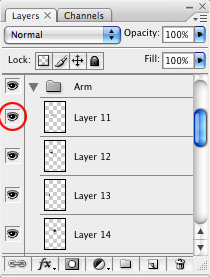
After all the intended body parts have been enlarged, it's a good idea to go back and check your enhancements. The best way to do this is to go to the Layers window and check each part individually (assuming they're all on separate layers).

Start at the top layer and zoom in around the area in question. Click the Eye icon at the left of the layer. This will hide the layer and you should see the original body part. Click the same icon again to show it. Do this on/off a few times quickly and it will almost seem like an animation. More importantly, it will show you imperfections in the morphed area.

Many times you will notice a hard edge that you didn't see before. Use the Eraser tool with a soft airbrush setting to remove the edge. There may be random pixels showing up in places you didn't intend or other errors you didn't notice before. This gives you a better way to see them.

This takes some time depending on how many layers you have. In the end your morphs will look cleaner and more realistic.

See the Full Tutorial and Happy Morphing
Related Posts Plugin for WordPress, Blogger...